

 SEARCH
 diglloydTools™
Designed for the most demanding needs of photographers and videographers.
The fastest, toughest, and most compatible portable SSD ever with speeds up to 2800MB/s.

$220 SAVE $130 = 37.0% Western Digital 16.0TB Western Digital Ultrastar DC HC550 3.5-in… in Storage: Hard Drives
|

|

|

|

|

|

|

|

|

|
Relocating iTunes and iPhoto Libraries

Both iTunes and iPhoto allow you to place your music/photo libraries anywhere you like.
iPhoto
Indeed, iPhoto allows you to have more than one library. More than one iPhoto library is especially advised if you have a huge number of photos that can be grouped sensibly (eg work vs personal), because performance will generally be better with a smaller library.
To move your iPhoto library, first copy it to the desired location. Then start iPhoto holding down the Option key; choose the desired library. When all is well, remove the original library— don’t get confused!
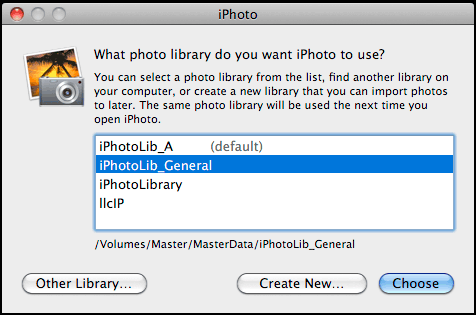
Choose/create an iPhoto library by holding down the Option key when iPhoto starts up
iTunes
You can move your iTunes library also. iTunes will even do the job for you if you use its preferences. You can also have more than one iTunes library.
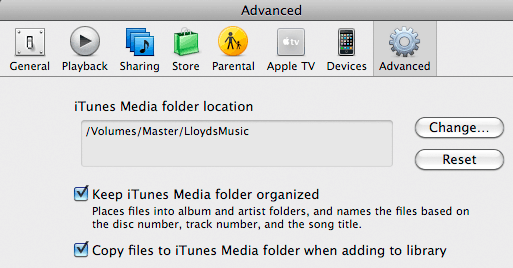
Change the iTunes library location
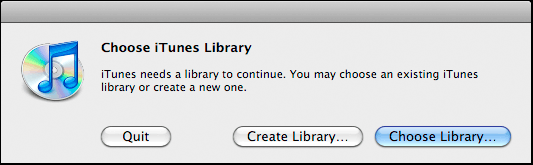
Choose/create an iTunes library by holding down the Option key when iTunes starts up
View all handpicked deals...
Seagate 22TB IronWolf Pro 7200 rpm SATA III 3.5" Internal NAS HDD (CMR)
$500 $440
SAVE $60
Seagate 22TB IronWolf Pro 7200 rpm SATA III 3.5" Internal NAS HDD (CMR)
SAVE $60
