

 SEARCH
 diglloydTools™
Designed for the most demanding needs of photographers and videographers.

Connect and charge all of your devices through a single Thunderbolt or USB-C port.

|

|

|

|

|

$220 SAVE $130 = 37.0% Western Digital 16.0TB Western Digital Ultrastar DC HC550 3.5-in… in Storage: Hard Drives
|

|

|

|

|
Declutter the Dock

Rule: get rid of cruft you don’t use; it just degrades the experience and causes visual confusion.
The dock contains all kinds of cruft that I don’t need, or that I don’t need immediate access to. Right-click or control-click on undesirable characters to Remove from Dock. You can always put something back later if you decide you want it; drag it back into the dock.
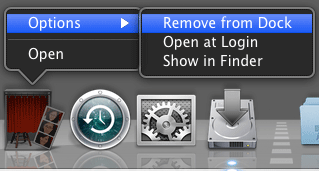
Remove unwanted items from the Dock
This is what my Dock looks like after I clean it up, but before I install the applications I use.

Cleaned up for what I use
Dock behavior
This is what I like, change it in System Preferences.
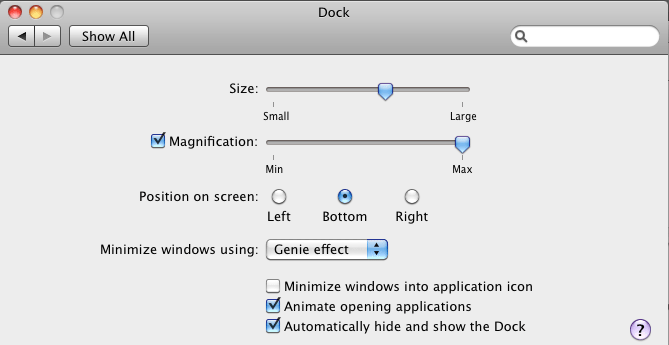
Dock settings
View all handpicked deals...
Seagate 22TB IronWolf Pro 7200 rpm SATA III 3.5" Internal NAS HDD (CMR)
$500 $400
SAVE $100
Seagate 22TB IronWolf Pro 7200 rpm SATA III 3.5" Internal NAS HDD (CMR)
SAVE $100
