

 SEARCH
 diglloydTools™
Designed for the most demanding needs of photographers and videographers.
The fastest, toughest, and most compatible portable SSD ever with speeds up to 2800MB/s.

$220 SAVE $130 = 37.0% Western Digital 16.0TB Western Digital Ultrastar DC HC550 3.5-in… in Storage: Hard Drives
|

|

|

|

|

|

|

|

|

|
Enabling the Developer / Debug Menu to Safari

With OS X Mountain Lion, Apple has removed certain useful facilities, like the command-key shortcut for clearing the browser cache.
Clearing the browser cache and many other useful features are added to a menu as follows.
Open Terminal (/Applications/Utilities), and enter this command:
defaults write com.apple.Safari IncludeDebugMenu 1
Quit Safari and restart it, and the new Develop menu will appear.
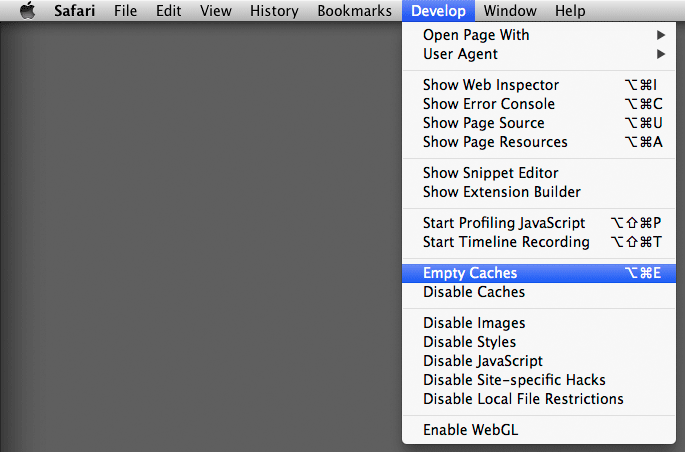
The Develop menu added to Apple Safari web browser
View all handpicked deals...
Seagate 22TB IronWolf Pro 7200 rpm SATA III 3.5" Internal NAS HDD (CMR)
$500 $400
SAVE $100
Seagate 22TB IronWolf Pro 7200 rpm SATA III 3.5" Internal NAS HDD (CMR)
SAVE $100
