

 SEARCH
 diglloydTools™

|

|

|

|

|

$220 SAVE $130 = 37.0% Western Digital 16.0TB Western Digital Ultrastar DC HC550 3.5-in… in Storage: Hard Drives
|

|

|

|

|
Buyer's Guide: Power Conditioning (UPS)

This page covers recommended power for any Mac. Your Mac, its hard drives, display, etc are all delicate equipment, and subject to damage from electrical spikes, especially in lightning prone areas of the country.
- Uninterrupted Power Supply (UPS)
- An Uninterrupted Power Supply (UPS) includes batteries, and provides protection against power fluctuations: black-outs, brown outs, voltage spikes, etc. A UPS provides battery power for some period of time for when the power fails.
A serious concern
See The Wall Street Journal: There Go the Servers: Lightning's New Perils (try this link if that one is restricted, unclear on which works when/why). Amazingly, lightning strikes are correlated with impaired economic output:
Even if electricity lines are shielded, lightning can cause power surges through unprotected phone, cable and Internet lines -- or even through a building's walls. Such surges often show up as glitches.
...
The economists concluded that the use of computers and the Internet spread more quickly in areas less prone to lightning strikes, boosting worker output there. This lightning effect didn't exist prior to the 1990s.
Don’t forget other wires
If you plug in an ethernet cable, a DSL or cable modem, or anything similar, you can have your Mac fried via that cable, even if the Mac itself is on a surge protector or UPS. Any cable going in needs some form of protection eg a surge protector with phone and cable connectors.
Play the odds
There’s little you can do against any kind of close-proximity lightning strike— everything gets fried, electricity jumps around and goes wherever it goes. What we’re talking about here is reasonable protection.
Surge protector
For surge protection with no battery backup, get a surge protector. Don’t buy cheap ones, but you don’t need the most expensive ones either.There are many good models out there. See How surge protectors work.
A surge protector plugged into the wall, with the UPS plugged into the surge protector is a good combination.
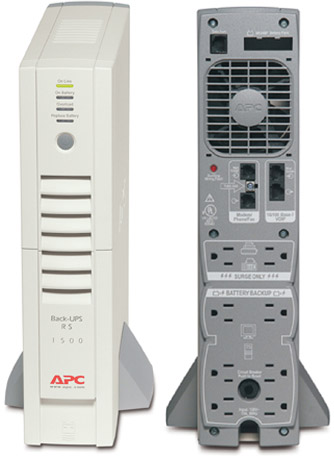
The APC BR-1500 1500VAPERMALINK
The 865 watt / 1500VA APC BR-1500 is now my favorite unit for all-around use. Its design allows the seamless addition of one additional battery, which doubles the width of the unit, but yields 2.45 times the battery runtime.
I do NOT recommend the newer BR1500G— see my March 1, 2011 blog entry discussing the noise issue.
I strongly advise getting this unit with the spare BR24BP battery; it just makes sense: a 400 watt load can run for 33 minutes with the BR-1500, but a whopping 81 minutes with the optional BR24BP battery.
I have two of these units now, each with its extra battery. I power the Mac Pro with one unit, and I power dual 30" displays with the other unit.
The unit also has protection for phone line and 10/100 ethernet VOIP (not gigabit ethernet). With six outlets having battery backup and two more outlets that are surge protected, it’s awfully handy.
My recommendation is ONLY for the original BR1500; I have not evaluated the BR1500G.
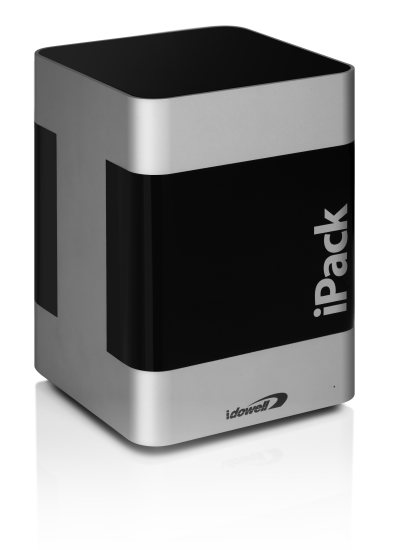
The iDowell iPack PERMALINK
No longer recommended. Reports of too many failures, poor support.
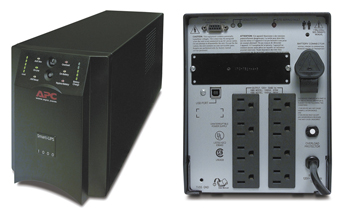
The APC Smart-UPS 1000VA PERMALINK
This is a beefier UPS than the iDowell iPack. It is bulky and heavy (over 40 pounds) and so can support a 335 watt load for about 20 minutes. It runs a very annoying fan while charging or when power fails, but in normal operation the fan remains completely off.
I use a ponderous 1500VA version of this unit on one Mac Pro, along with an additional battery (multiple batteries can be attached for more runtime). On the other quad-core Mac Pro, I use the iDowell iPack. APC units get bigger and bigger, it all depends on how much runtime you want.
Seagate 22TB IronWolf Pro 7200 rpm SATA III 3.5" Internal NAS HDD (CMR)
SAVE $60
