

 SEARCH
 diglloydTools™
Designed for the most demanding needs of photographers and videographers.
The fastest, toughest, and most compatible portable SSD ever with speeds up to 2800MB/s.

|

|

|

|

|

$220 SAVE $130 = 37.0% Western Digital 16.0TB Western Digital Ultrastar DC HC550 3.5-in… in Storage: Hard Drives
|

|

|

|

|
Buyer's Guide: eSATA for MacBook pro
2009-11-10 updated 2009-12-31 • SEND FEEDBACK • 
Related: eSATA, How-To, laptop, MacBook, MacBook Pro, Other World Computing
Related: eSATA, How-To, laptop, MacBook, MacBook Pro, Other World Computing
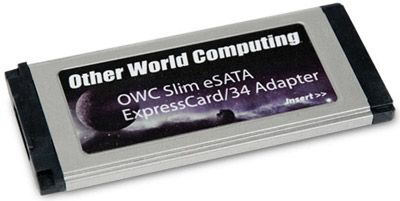
OWC Slim eSATA ExpressCard/34
Using eSATA on the MacBook Pro is possible only if it has the ExpressCard/34 slot.
The MacBook Pro has become the MacBook Semi-Pro as of June 2009. Only the 17" model still has the ExpressCard/34 slot as of July 2010.
Future models might benefit from high-speed USB 3.0, but that is likely mid 2010 for Macs.
Be sure to get the 17" model for eSATA support, otherwise there is NO WAY to add fast external storage.
Note that some MacBook Pro models have electrical issues (Apple defect), and do not work reliabily with ExpressCards, see the MacBook Pro compatibility list on the OWC site.
See the review of eSATA cards for the MacBook Pro.
View all handpicked deals...
Seagate 22TB IronWolf Pro 7200 rpm SATA III 3.5" Internal NAS HDD (CMR)
$500 $440
SAVE $60
Seagate 22TB IronWolf Pro 7200 rpm SATA III 3.5" Internal NAS HDD (CMR)
SAVE $60
