

 SEARCH
 diglloydTools™
Designed for the most demanding needs of photographers and videographers.
The fastest, toughest, and most compatible portable SSD ever with speeds up to 2800MB/s.

$220 SAVE $130 = 37.0% Western Digital 16.0TB Western Digital Ultrastar DC HC550 3.5-in… in Storage: Hard Drives
|

|

|

|

|

|

|

|

|

|
Fixing Controls in Finder Icon View Windows

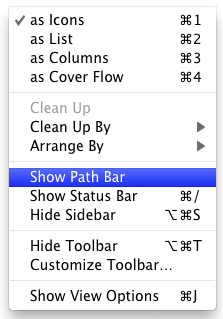
Show the Path Bar and Status Bar
Status: same poor design will probably linger for years.
In a Finder window in icon view, if you don’t see the handy controls for growing the icon size or the path to files, be sure to and using the menu.
Then choose and set them as the default settings.
This apparent change has already confused me and a user that wrote to me. Especially the icon size slider is very useful in icon view, so useful that’s it’s incredible to think that icon view should ever be available without showing that slider.
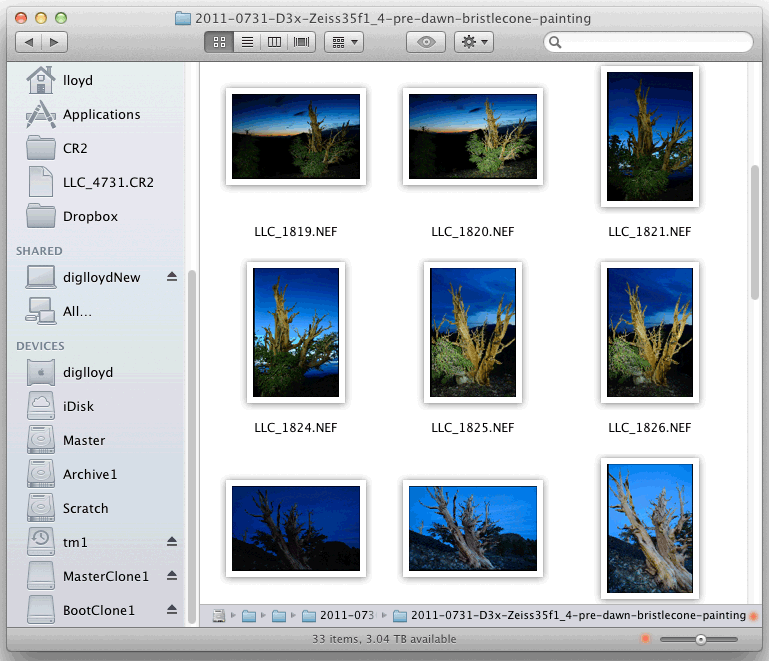
Show the Path Bar and Status Bar for useful information and controls
View all handpicked deals...
Seagate 22TB IronWolf Pro 7200 rpm SATA III 3.5" Internal NAS HDD (CMR)
$500 $440
SAVE $60
Seagate 22TB IronWolf Pro 7200 rpm SATA III 3.5" Internal NAS HDD (CMR)
SAVE $60
