


 SEARCH
 diglloydTools™


$220 SAVE $130 = 37.0% Western Digital 16.0TB Western Digital Ultrastar DC HC550 3.5-in… in Storage: Hard Drives
|

|

|

|

|

|

|

|

|

|
Fast Graphics Card and OpenGL Not So Great

As of January 2011, I have yet to measure anything that I do with photography where the “faster” graphics card shows any advantage over the “slower” one. The route to using a faster card is OpenGL, but that opens a can of worms.

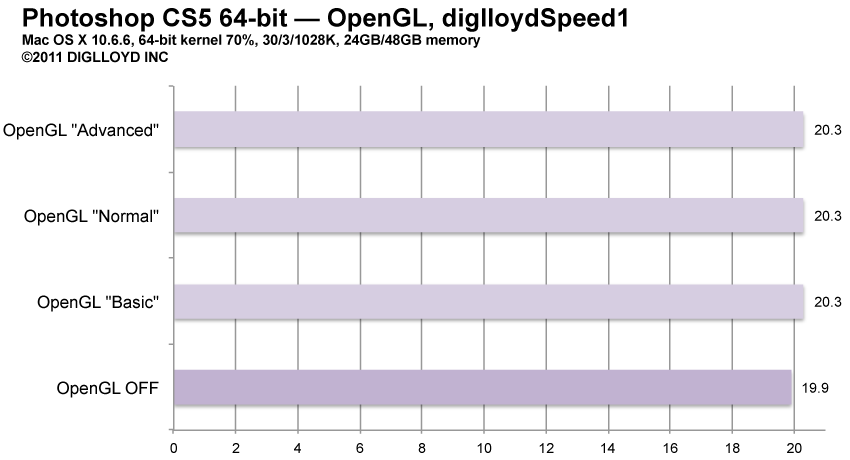
Using OpenGL (which exposes the power of the GPU) makes some operations run more slowly! Since nothing I do runs faster with OpenGL, and it also causes some distracting screen refresh problems, I say no to OpenGL, and turn it off.
Test your own scenarios, because there almost certainly are specific tasks likely to benefit. However, my advice is to not waste your money on a “faster” graphics card, at least not for a Mac Pro for photography, because the “slower” graphics card is already very fast.
If you’re doing 3D rendering, or certain HD video tasks, then the fastest card you can get might help you.
The numbers
The difference is only about 5%, but that’s not in favor of OpenGL.
I’ve tested several graphics cards, including Apple’s latest offerings, on several Mac Pros, ands this is The Way It Is.
Seagate 22TB IronWolf Pro 7200 rpm SATA III 3.5" Internal NAS HDD (CMR)
SAVE $100
