

 SEARCH
 diglloydTools™
Designed for the most demanding needs of photographers and videographers.
The fastest, toughest, and most compatible portable SSD ever with speeds up to 2800MB/s.

|

|

|

|

|

$220 SAVE $130 = 37.0% Western Digital 16.0TB Western Digital Ultrastar DC HC550 3.5-in… in Storage: Hard Drives
|

|

|

|

|
Optimizing Apple Aperture

Apple Aperture ships with its Enable Faces feature turned on, an automatic performance hit.
When importing images, the Enable Faces feature results in a 28% performance hit, as shown below. If you work is anything bug people, this default setting is slowing you down every time you Import.
On the 2010 3.33GHz Mac Pro hexacore, I observed a 28% performance hit for Enable Faces.
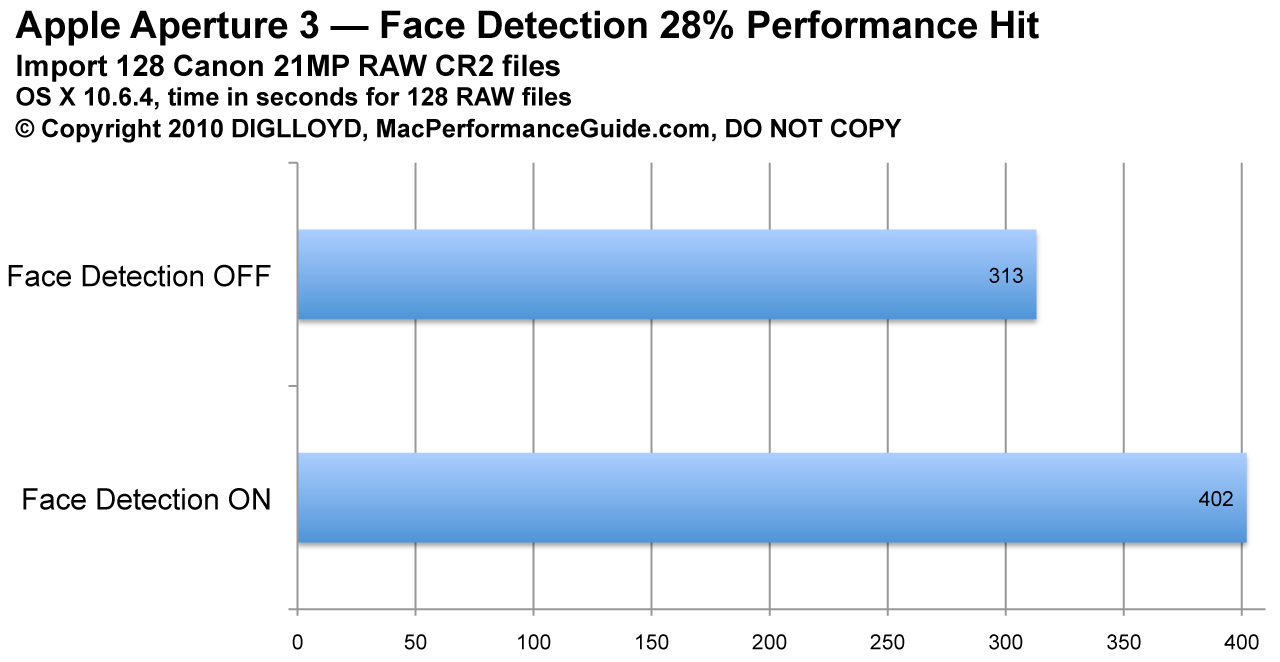
Turn Enable Faces OFF (leave it unchecked)
Disabling face detection
Uncheck the box. Instant speed boost for Import.
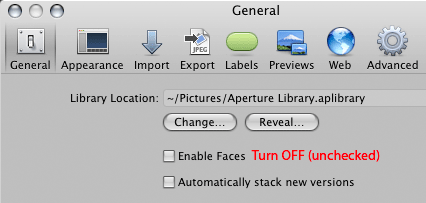
Turn Enable Faces OFF (leave it unchecked)
View all handpicked deals...
Seagate 22TB IronWolf Pro 7200 rpm SATA III 3.5" Internal NAS HDD (CMR)
$500 $440
SAVE $60
Seagate 22TB IronWolf Pro 7200 rpm SATA III 3.5" Internal NAS HDD (CMR)
SAVE $60
