

 SEARCH
 diglloydTools™
Designed for the most demanding needs of photographers and videographers.

The fastest, toughest, and most compatible portable SSD ever with speeds up to 2800MB/s.

|

|

|

|

|

$220 SAVE $130 = 37.0% Western Digital 16.0TB Western Digital Ultrastar DC HC550 3.5-in… in Storage: Hard Drives
|

|

|

|

|
Restoring Files with Time Machine

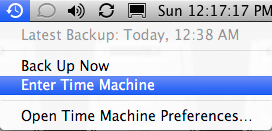
To go back in time...
Every hour, Time Machine kicks in and takes note of new files, changed files and deleted files. New and changed files are backed-up; deleted files (all versions thereof) remain in the prior Time Machine backups. Obviously your backup drive must be online and available for this to happen.
You can “go back in time” to find any version of a file or folder: today, yesterday or a month ago, then restore that file or folder. Simply choose .
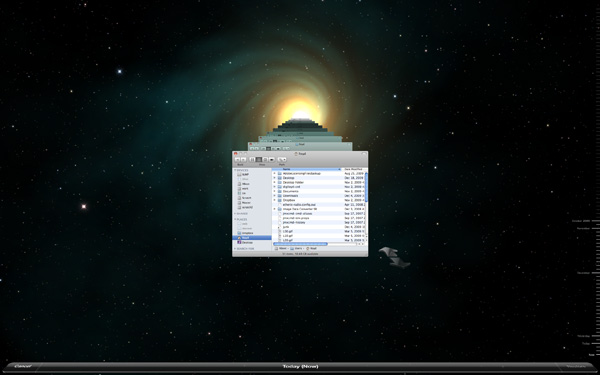
Going back in time to retrieve something...
Restoring an entire volume
You can restore an entire volume with Time Machine, but I prefer to use it selectively, and resort to full backups if/when an entire drive fails.
I also prefer to keep a clone of my boot drive in case that drive fails, because Time Machine backups are not bootable, but a clone is.
View all handpicked deals...
Seagate 22TB IronWolf Pro 7200 rpm SATA III 3.5" Internal NAS HDD (CMR)
$500 $400
SAVE $100
Seagate 22TB IronWolf Pro 7200 rpm SATA III 3.5" Internal NAS HDD (CMR)
SAVE $100
