

 SEARCH
 diglloydTools™
Designed for the most demanding needs of photographers and videographers.

The fastest, toughest, and most compatible portable SSD ever with speeds up to 2800MB/s.

|

|

|

|

|

$220 SAVE $130 = 37.0% Western Digital 16.0TB Western Digital Ultrastar DC HC550 3.5-in… in Storage: Hard Drives
|

|

|

|

|
Monitoring Battery Life

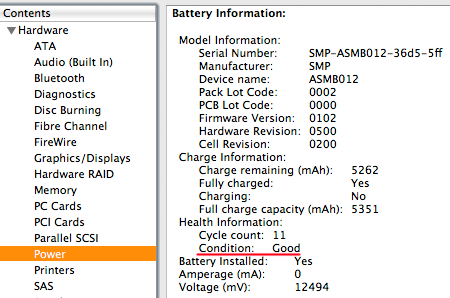
Checking battery status and life
To check on your laptop’s battery life, choose Ab from the Apple menu at top left of the menu bar, click on , and choose .
The status shows all sorts of useful things about the battery, including the ount and .
By 300 full charges, your battery may be capable of only 80% of its original capacity. Time itself causes wear an tear also: after two years most batteries are not up to snuff, even if the recharge count is low.
You can use tools like Battery Health Monitor if you have further concerns.
View all handpicked deals...
Seagate 22TB IronWolf Pro 7200 rpm SATA III 3.5" Internal NAS HDD (CMR)
$500 $440
SAVE $60
Seagate 22TB IronWolf Pro 7200 rpm SATA III 3.5" Internal NAS HDD (CMR)
SAVE $60
