

 SEARCH
 diglloydTools™


$220 SAVE $130 = 37.0% Western Digital 16.0TB Western Digital Ultrastar DC HC550 3.5-in… in Storage: Hard Drives
|

|

|

|

|

|

|

|

|

|
Upgrading a Mac Pro to More Cores or Faster CPU

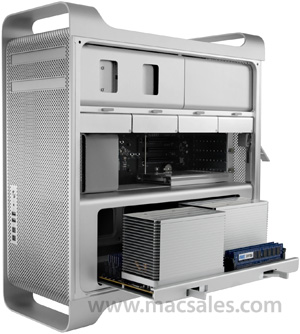
With OWC’s CPU upgrade program, an upgrade to a faster CPU or more CPU cores is made easy.
As of late 2014, OWC can upgrade the CPU in the 2009 or 2010 or 2012 Mac Pro models, and can also upgrade the CPU in a 2013 Mac Pro.
Apple won’t sell you a 3.33Ghz 12-core Mac Pro, but you can still have one! Or 3.46 GHz.
That’s what I did. I’m now happily running my 8-core 2.4GHz Mac Pro with a brain transplant: the 12-core 3.33Ghz model—see my review.
You won’t believe how slick this upgrade is— send OWC your existing CPU tray, wait a few days for the upgraded tray, then pop it in and boot up!
The best 2010 Mac Pro system to upgrade is the 2.4GHz 8-core system, because it’s the least expensive.
2010/2012 upgrades
(similar upgrades for 2009 model)
Availability for fastest speeds as of mid February, 2011. Not all possibilities shown, see the OWC CPU upgrade page.
| From | To | Comments |
|---|---|---|
| 2.8GHz 4-core | 12-core up to 3.46 GHz 8-core up to 2.66 GHz 4/6core up to 3.46 GHz |
Most cost effective way to upgrade. |
| 3.2GHz 4-core | same options as above | Better to upgrade the 2.8GHz model for lower cost |
| 2.4Ghz 8-core | 12-core up to 3.46GHz | Reasonable total cost. |
| 3.33Ghz 6-core | 12-core up to 3.46GHz | Not cost efficient, but can be done. |
| 12-core | 12-core up to 3.46 GHz | Not cost efficient, but can be done. |
Heat dissipation and higher power draw
The 3.33GHz W5680 is a 130 watt CPU, whereas Apple’s 2.93GHz 12-core uses 95 watts. So under max load, the faster CPUs will draw 2X35 = 70 watts more power.
The single-CPU 2010 Mac Pros all use 130 watt parts, so there is no real difference with a dual CPU system other than total power draw; each CPU has its own heat sink on the dual core systems, each generating the same heat as the single-CPU systems. The Mac Pro fan system can easily deal with this; even under full load I found that the fan noise increased only a little.
I’m completely comfortable in my usage of this upgraded system, and I beat on it harder than most users. If you’re buying a fast system to run 24X7 at max CPU load with maxed-out heat-belching 15K rpm drives and the PCIe slots full of power hungry cards—who knows.
Cost and value
The 3.33Ghz CPU itself is a very expensive part, and so the great bulk of the upgrade cost is the dual CPUs themselves. In terms of value, it makes sense to upgrade to the 3.33Ghz 12-core only if you must have the last drop of performance. For single-CPU upgrades, its a friendlier price situation, such as going from 2.66Ghz to 3.33Ghz.
Seagate 22TB IronWolf Pro 7200 rpm SATA III 3.5" Internal NAS HDD (CMR)
SAVE $100
