


 SEARCH
 diglloydTools™


$220 SAVE $130 = 37.0% Western Digital 16.0TB Western Digital Ultrastar DC HC550 3.5-in… in Storage: Hard Drives
|

|

|

|

|

|

|

|

|

|
MacBook Pro i7 SATA performance With Solid State Drives: BIZARRE

See the previous page on performance of the internal SATA ports.
Y’all can’t make this stuff up.
In perhaps one of the more bizarre things I’ve observed while testing over the last decade, there’s a catch:
USB devices and eSATA has no such effect.
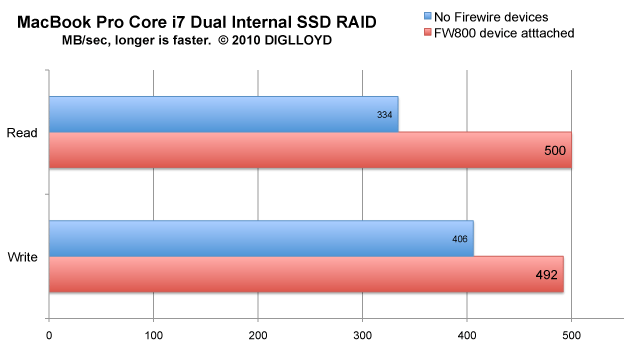
When the tests on the previous page were performed, the MacBook Pros were booted off a Firewire 800 drive, so those tests shows maximum performance. Booting without an attached and powered-on Firewire 800 deviced shows a major performance hit (MacBook Pro Core i7 only).
The hit
It’s absolutely ridiculous, but 100% repeatable (Mac OS X, MacBook Pro Core i7 2.66GHz). Here is the behavior, and it’s a 33% performance hit for reads and 17% for writes:
Workaround
Whether this is a hardware or a software bug is unclear. (Tests with 64-bit Mac OS X kernel).
The workaround is to get a Firewire 800 card reader (which most photographers need anyway), and leave it plugged in. Alternately, a drive like the Mercury Elite AL-Pro Mini will do the same neat trick.
Seagate 22TB IronWolf Pro 7200 rpm SATA III 3.5" Internal NAS HDD (CMR)
SAVE $100
