diglloyd
Mac Performance Guide

OWC Mercury Accelsior PCI Express SSD
Extreme reliability and performance. Delivered.
Our premium upgrade service provides peace of mind.
MPG Photo Workstation MPG Pro Laptop

100% Kona, 100% Family Owned

WindInMyFace.com — Bicycling blog, gear, rides, training, nutrition

Are you a photographer?

Don’t miss all the great articles, news and analysis at

diglloyd.com
diglloyd.com

Friday, September 10, 2010

Hot Corners to Work Around Black-screen Video Problem on Mac Pro

Please refer to Sept 9 notes on the Mac Pro video problem.

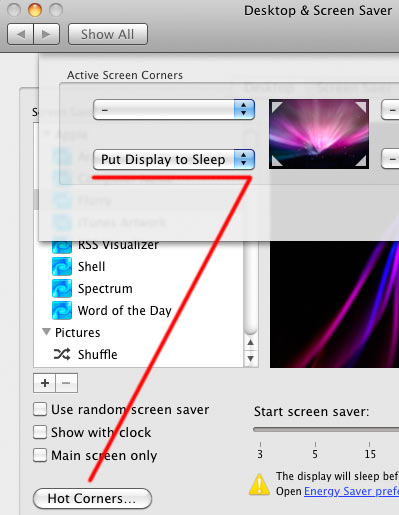
Here is a workaround (absurd to be sure) that works for me. Set up a “hot corner” that puts displays to sleep. When a screen stays black, mouse into the hot corner; this blanks the display(s), then mouse out and this causes some kind of reset to occur. So far, this has worked 100% of the time for me.

Hot Corner control is in System Preferences => Desktop & Screen Saver.

hot corners to blank/unblank screen on Mac Pro
Set up a hot corner to toggle screen off and on

Up to 2.0TB of Portable, High-Performance, Bus-Powered Capacity

diglloyd Home Page | Terms of Use | Copyright © 2008-2013 diglloyd Inc, all rights reserved. | Contact | Newsletter + Alerts