

 SEARCH
 diglloydTools™


|

|

|

$610 SAVE $110 = 15.0% ZEISS 32mm f/1.8 Touit Lens for FUJIFILM X OUT OF STOCK in Lenses: Mirrorless
|

|
RAID-4 / RAID-5 and RAID 6 for Performance and Reliability

Related: backup, fault tolerance, RAID, RAID-0, RAID-4, RAID-5, RAID-6, SoftRAID, storage
A RAID-5 uses the equivalent of one drive capacity of N drives for parity information. It can be thought of as a RAID-0 stripe with one parity drive (“striping with parity”), for fault tolerance. RAID-5 uses distributed parity and RAID-4 uses a dedicated parity drive; the functionality is equivalent.
Should one drive fail, RAID-5 / RAID-4 degrades to a RAID-0 stripe.
RAID-5 offers the following benefits:
- High performance: approaching the speed of RAID-0 stripe. With N drives in a RAID-5, approaches the speed of N-1 drives in a RAID-0 stripe.
- Fault tolerance: parity information that allows one drive to fail with no data loss. Particularly with four or more drives, RAID-5 adds a margin of safety not provided by RAID-striping. For some uses, RAID-5 makes sense with as few as 3 drives.
- High capacity: since typical RAID-5 setups would use 4 or more drives, thus the total capacity tends to be large.
RAID 5 is usually achieved with hardware (via an enclosure or expansion card), but RAID-5 software solutions will emerge in 2014.
RAID 6
RAID-6 is similar to RAID-5, but uses two or more parity drives for fault tolerance. For example, eight 4TB drives in a RAID-6 might be configured with two parity drives for a total usable capacity of 24TB.
Capacity
RAID 5 requires a minimum of three drives, since two drives could be either a RAID-0 stripe or a RAID-1 mirror or separate drives—that 3rd drive is needed for parity information.
With N drives in a RAID-5, the capacity achieved is that of N-1 drives, since one drive is used for parity.
Using four 4TB drives, a 4-drive RAID 5 would use that 4 X 4TB = 16TB to deliver a usable capacity of 3 X 4TB = 12TB.
TIP: the entire capacity of a RAID-5 might be awkward to backup. Hence partitioning a RAID-5 into volumes of 4TB each (max) allows simple and fast clone backup to single external 4TB backup drives.
Cold spare(s)
When a drive fails in a RAID-5, operation continues with no data loss; it becomes a RAID-0 stripe. But a 2nd failure will fail the entire RAID. Hence it is critical to have at least one “cold spare” on hand, preferably pre-tested.
When (not if) a drive fails, it can be swapped out for the cold spare, which allows the RAID-5 to rebuild the parity information and restore its fault tolerance to a subsequent drive failure. Rebuilding can take 12-36 hours depending on drive capacity and usage.
Relative performance
Write and read performance in MB/sec is shown across a 2TB partition.
- The top pair of lines is a 4-drive RAID-0 stripe, showing ~640 MB/sec.
- The middle pair is a 3X stripe, showing ~470 MB/sec.
- The green and blue heavier lines are a RAID-5 stripe using four drives, showing ~450MB/sec reads and ~370MB/sec writes.
This particular RAID-5 can be thought of as a 3-drive RAID-0 stripe with parity. Hence its performance for reads is very close to a 3-drive RAID-0 stripe. Write performance is still excellent but there is overhead to calculating the parity information and writing it to that 4th drive. Faster drives might perform better, and this graph is from a beta version of SoftRAID 5.
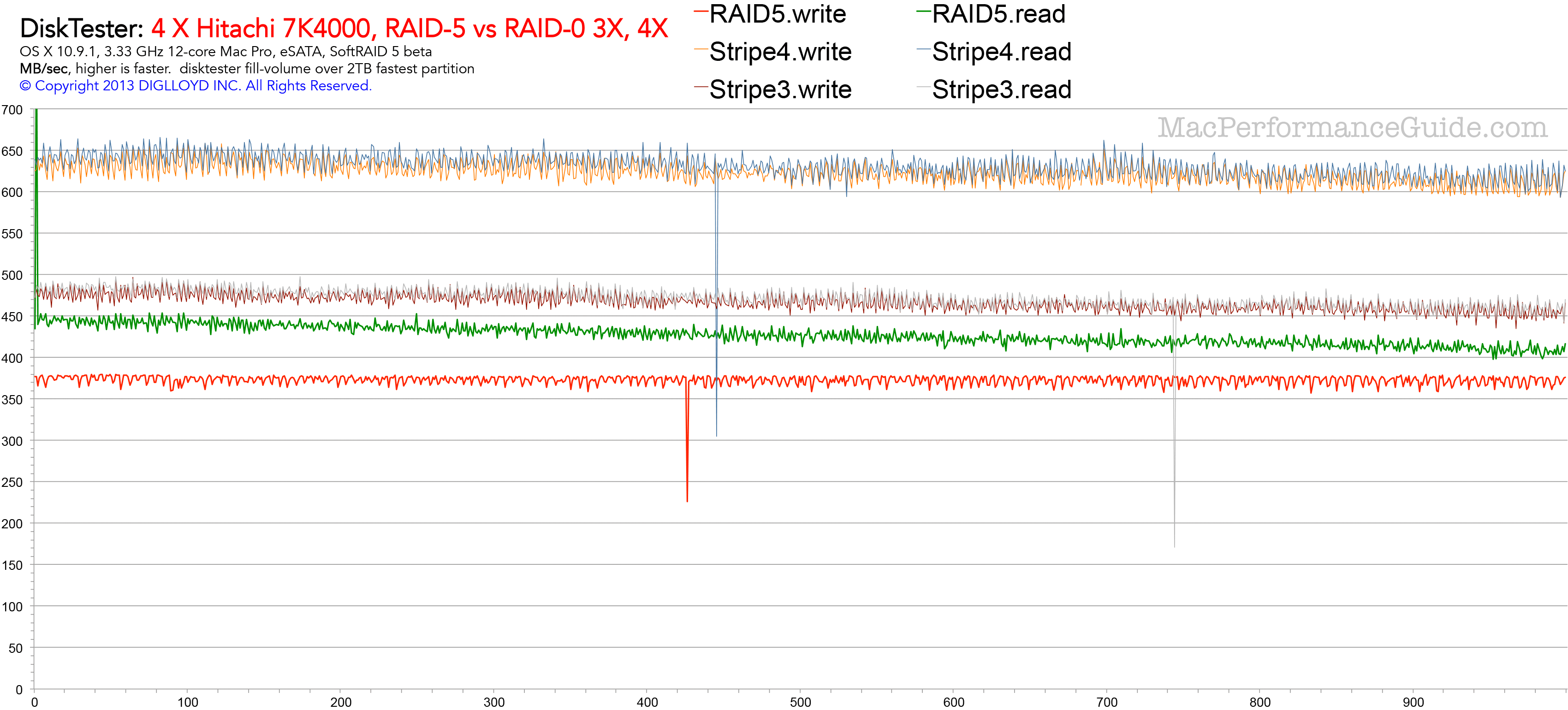 RAID-5 vs 3X RAID-0 stripe vs 4X RAID-0 stripe
 (SoftRAID 5 beta)
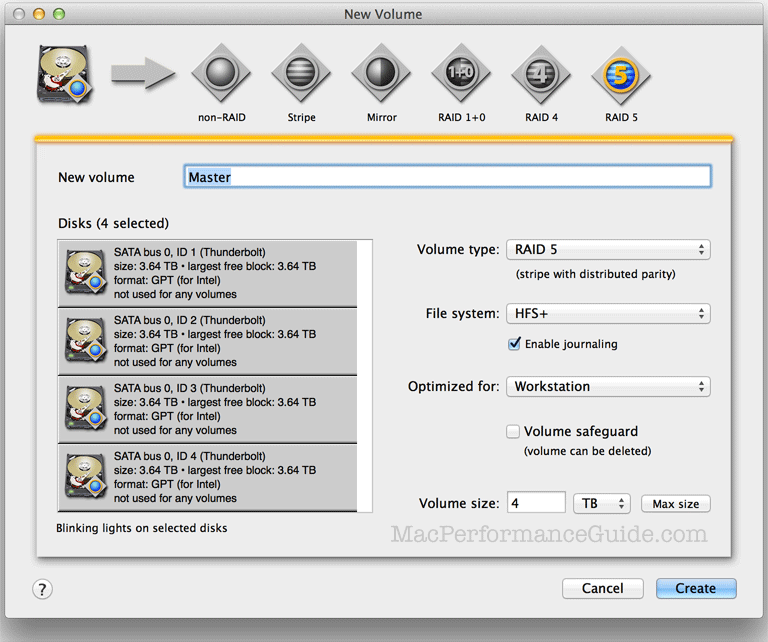
Creating a software RAID-5
Create a 4-drive RAID-5 volume Master of capacity 4TB.
Appendix: misleading claims about RAID 5
Jan 2014: Archival information which time has borne out.
In 2009, an article by Robin Harris appeared on ZDNet (Why RAID 5 Stops Working in 2009), rebutted by various articles, including this one.
The article claims that RAID 5 is fatally flawed because a rebuild after a drive failure would be all but guaranteed to fail from a read error (in the context of 2TB drives). It makes other tenuous assumptions about failure rates that don’t reflect my experience, or even how most people use their computers. The article lacks any real-world substantiation, and uses statistics incorrectly to come to a flawed conclusion.
The article also misses a key point: a RAID 5 remains perfectly usable after a drive has failed. Data can be copied or backed-up. In fact, the unit could then continue to works for months or years, though it could not tolerate another drive failure.
I’ve been running a 4-way RAID 0 stripe for four years now, and the only failure I had was a Maxtor 500GB back in 2006 and that was a quick failure, a bad drive to start with. My Mac Pro runs 10-14 hours a day, so that’s a darn good track record.
Ideal for any Mac with Thunderbolt 3
Dual Thunderbolt 3 ports
USB 3 • USB-C
Gigabit Ethernet
5K and 4K display support plus Mini Display Port
Analog sound in/out and Optical sound out
Works on any Mac with Thunderbolt 3
Don’t assume, test!
But it’s always good to test, so I set about determining if I could produce even a single error from my Hitachi 2TB 7K2000 hard drives, reviewed here. I actually have twelve of these drives, and I’ve never had a problem of any kind with them.
I installed four of the 7K2000 drives into my Mac Pro Nehalem, configuring them as a RAID 0 stripe, my interest being maximum speed to detect read errors.
Next I ran SoftRAID 4.0 “Certify” for well over one full pass. There were zero errors on all four drives. That represents testing 10-12TB of data access with no errors (I ran about 1.4 passes before stopping it).
After that, I filled the array with huge files, then ran IntegrityChecker to compute SHA1 hashes on all files. I ran four complete passes (and a partial fifth pass), having it verify all files, which means that more than 32TB of data was read without a single error.
In total, my testing showed the ability to read more than 40TB of data on 4 drives with zero errors. That’s 20 times as much data as the alleged size issue in the ZDNet article. If the analysis in that article were correct, then I ought to go buy lottery tickets right now.
