

 SEARCH
 diglloydTools™


|

|

|

|

|

$220 SAVE $130 = 37.0% Western Digital 16.0TB Western Digital Ultrastar DC HC550 3.5-in… in Storage: Hard Drives
|
$500 SAVE $75 = 13.0% OWC 1.0TB OWC Atlas Pro SDXC V60 UHS-II Memory Card (2-Pack) in All Other Categories
|

|

|

|

|
Use a Hardware Firewall With Unroutable LAN

Advanced topic. But highly recommended.
Many internet access points (cable, DSL, etc) allow the use of a local area network (LAN), which is unroutable.
Using a wireless router is a bad idea. Avoid it whenever possible.
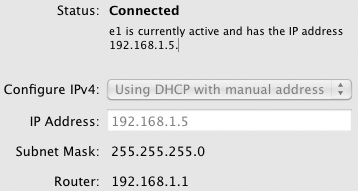
Your computer should have an IP address of 192.168.0.x or 192.168.1.x
A good unit has the capability for a local LAN, which is unroutable (a few hundred machines can all reach the internet, but only explicitly configured machines can be reached from the internet; there is no way to reach them, since their addresses are all unroutable. The firewall can be configured to route only needed services to specific machines.
Local LAN IP addresses are of the form 192.168.0.x or 192.168.1.x. Such addresses cannot be reached from the internet by default with any half-decent hardware firewall. Netgear, Comcast, etc all have such devices, and they are not expensive
